
Contests
A contest is /contest/<key>, its standings /contest/<key>/ranking/, and the list /contests/. The key is lowercase, unique and permanent once the contest has run.
Formats
The format decides how submissions become a score; changing it after the contest has run means a rescore. The contest page states the rules in words, generated from the format and its configuration.
| Format | Key | Score | Tiebreak | Options | Labels |
|---|---|---|---|---|---|
| Default | default | Best submission per problem | Cumulative time, moved by every submission | none | numbers |
| IOI | ioi16 | Best score per batch, added up across submissions | none by default | cumtime: false | numbers |
| Legacy IOI | ioi | Best single submission per problem | none by default | cumtime: false | numbers |
| AtCoder | atcoder | Best submission per problem | Last scoring submission plus penalty | penalty: 5 | numbers |
| ICPC | icpc | Problems solved | Penalty time, then last accepted submission | penalty: 20 | letters |
| ECOO | ecoo | The last submission to each problem, plus bonuses | none by default | cumtime: false, first_ac_bonus: 10, time_bonus: 5 | numbers |
ECOO's first_ac_bonus is added for a problem solved on the first attempt, ignoring compile and internal errors; time_bonus adds one point per whole interval of that many minutes left when a scoring submission is made. Scores round to points_precision, three decimals by default, and cumulative time is whole seconds, truncated.
ICPC penalty for a solved problem:
minutes from the participation start to the accepted submission
  + penalty * (rejected submissions before it)
A submission counts as rejected unless it is accepted, a compile error or an internal error. Unsolved problems contribute no penalty, and a problem counts once, when it is first accepted.
TIP
An aborted submission adds a penalty on the ranking page but not on the hall scoreboard, so the two can disagree by one penalty.
Problem list release
A contest's problem list is shown to general viewers at its start by default. Organisers can instead release it at the end, or choose Never to keep it hidden from general viewers. You must still be allowed to view the contest. Moving the selected time into the future or choosing Never can hide the list again.
Contest editors, authors, curators, testers and superusers can see the list early. Current participants and designated spectators can see it once the contest starts; designated spectators with spectatorSeeProblemsEarly can also see it before then. A past participation alone does not bypass the release policy.
Releasing the list does not publish the statements. A problem you cannot access appears as Restricted problem, without its name, code or link. Standings retain its label and score column even when its identity is hidden. Clarifications, solve progress and statistics also withhold inaccessible problem identities. Cloning a contest requires access to its list and every problem in it, unless you have privileged contest access.
Organisers separately choose whether to publish eligible private problems to the general problem set at the start or end. See contest release settings.
Freeze and blind mode
freezeMinutes stops the public board updating that many minutes before the end; 0 disables it. A frozen cell shows ? over the number of withheld submissions, and the ranking is computed from pre-freeze submissions only. Contest editors always see the real board, and virtual participants are never frozen. blindDuringFreeze goes further: the contestant's own rows show pending until the contest ends.
Nothing expires the freeze. Afterwards Reveal scoreboard drops it at once and Freeze scoreboard puts it back, or run the reveal ceremony from the hall scoreboard.
The hall scoreboard
/scoreboard/<event> is a projector board for a live event, configured as a scoreboard event in the staff console; /scoreboard/ lists them. It always applies ICPC scoring whatever the contests use, and it ignores each contest's scoreboard visibility, so treat the URL as public. Problem names and codes still follow contest list release and problem access rules; the event feed omits entries whose problem identity cannot be shown.
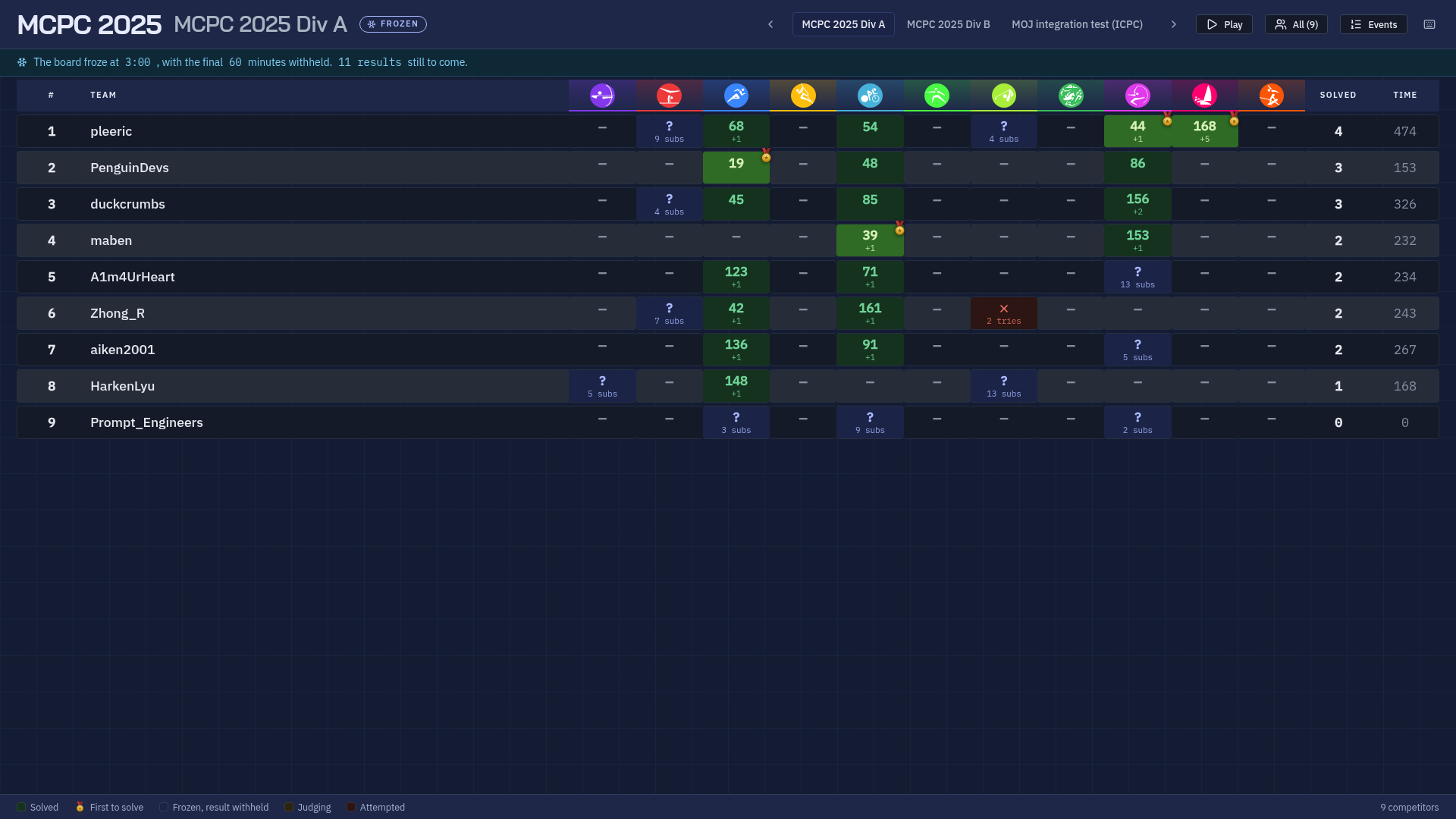
Each contest in the event is a division with its own freeze, first blood and ranking, shown one at a time with a cross-fade. Badges come from organisation membership, and the event's in-person organisation drives the All / In person filter, which re-ranks what is left so the board reads 1, 2, 3. The olympics theme replaces problem labels with sport pictograms, and an event can show a flag beside each name from a URL template containing {username}.
? shows the keyboard sheet: arrows change division, P starts the automatic tour, F the event feed, I the in-person filter, and, for staff, E badge editing and R the reveal.
The reveal walks the frozen board upward from the bottom row, one cell at a time, highlighting the next target before resolving it. Space, Right or Enter steps forward, Left or Backspace undoes, Escape leaves. It is shared state, so every screen turns the same cell over at once. Reveal all finishes in one step, and undo then unwinds it cell by cell; Unfreeze clears the recorded reveals and cannot be undone.
Organisation standings
A scoreboard event can also rank organisations by pooling their members' scores across all of its contests, at /scoreboard/<event>/organizations/, linked from the hall scoreboard. Staff turn it on in the event's Organisation standings section of the staff console with a decay between 0 and 1 and the organisations that take part, in order. An empty list means every organisation an entrant belongs to.
An entrant counts for its first membership, by membership order, among the listed organisations, and not at all if it is in none of them. Only live participations count, never virtual, spectating or disqualified ones. A problem's score is the one the contest's format gives it on the ranking page, bonuses included.
On each problem, an organisation's scores above zero are sorted best first, and each one after the best is weighted by one more power of the decay:
s0 + s1 * decay + s2 * decay^2 + ...The total adds that up over every problem of every contest in the event. Equal totals share a rank and keep the configured order, or alphabetical order when no organisations are listed. A decay of 1 adds every score in full; a decay of 0 keeps only the best score on each problem.
With a decay of 0.5, three entrants from one university score 100, 80 and 60 on problem A of the first contest, and only one of them scores, 70, on problem A of the second:
| Problem | Scores, best first | Organisation score |
|---|---|---|
| First contest, A | 100, 80, 60 | 100 + 80 × 0.5 + 60 × 0.25 = 155 |
| Second contest, A | 70 | 70 |
| Total | 225 |
Each row shows the organisation's logo, total and score per problem, and expands to list its entrants with their own totals. The page follows the hall scoreboard's visibility, problem identities and freeze: while a division is frozen, anyone who cannot run the reveal sees each entrant's scores from before the freeze, and a cell the reveal has turned over counts in full again.
Joining
| Kind | Clock | Rated | On the scoreboard |
|---|---|---|---|
| Live | The contest's, or your own window | Yes | Yes |
| Spectating | The contest's | No | No |
| Virtual | Starts when you do | No | Only your own |
Joining is a confirmation dialog, because the timer cannot be stopped. A contest with a timeLimit gives each participant a window of that length inside the contest's overall period, and the countdown then says when your window closes. Leaving takes you out of contest mode but does not stop the window.
While a participation is live the site is in contest mode: the problem list shows only the contest's problems, submission lists are filtered to it, editorials are hidden and problem voting is off. A contest bar renders under the navigation with one chip per problem coloured by your state on it, links to Standings, your Submissions and Clarifications, and a countdown that turns amber under five minutes and red under one.
With useClarifications on, staff post clarifications against a contest problem and they appear for viewers who can see the released list and access that problem.
Access control
A user has to pass all of these.
| Restriction | Effect |
|---|---|
isVisible | Off means only editors know the contest exists. |
accessCode | A shared secret typed on join. |
isPrivate | Only the listed users may join. |
isOrganizationPrivate | Only members of the listed organisations. |
limitJoinOrganizations, classIds | Narrows which organisation or class a member must be in. |
bannedProfileIds | Blocks named people regardless of everything else. |
lockedAfter | Submissions can no longer be judged, rejudged or edited. Needs judge.lock_contest. |
Scoreboard visibility is separate: visible, hidden until your participation ends, hidden for the contest, or hidden even afterwards. The hall scoreboard ignores it.
Ratings
A rated contest moves ratings when a staff member rates it, not automatically at the end, and rating one re-rates every contest that ended after it in end-time order. isRated allows it at all, rateAll rates everyone who joined rather than only those who submitted, ratingFloor and ratingCeiling restrict who is rated, performanceCeilingOverride caps what the contest can award, and rateExcludeProfileIds skips individuals.
Rating classes are Newbie below 1000, then Amateur 1000, Expert 1300, Candidate Master 1600, Master 1900, Grandmaster 2400 and Target 3000, each to the next. The class is the colour a username is drawn in across the site. A disqualified participation scores -9999 and, in a rated contest, counts as a loss.